
StorageTreasures Auction App
OpenTech AllianceShopping
3.6318.00 Reviews
- Version
- 1.22.0
- Installs
- 100.00K
- Age Rating
- Mature 17+
Screenshots
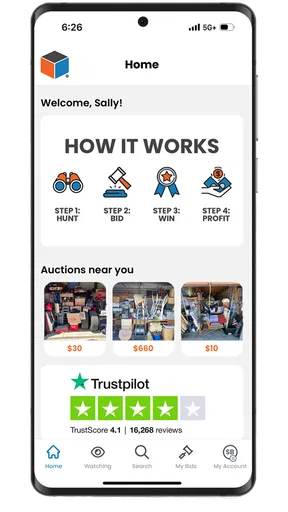
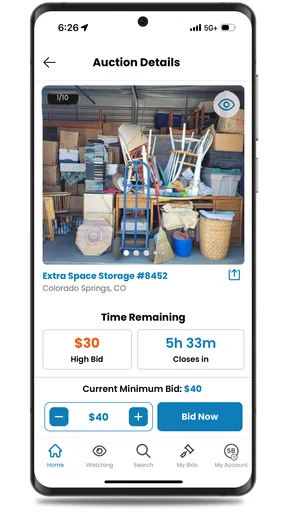
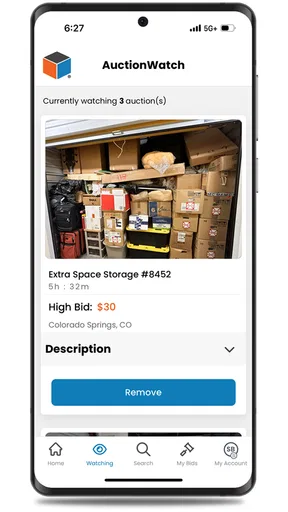
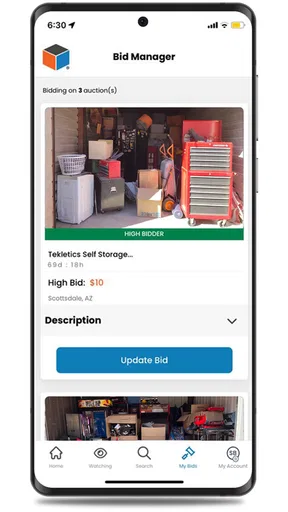
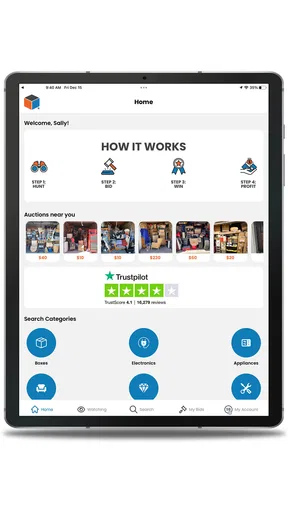
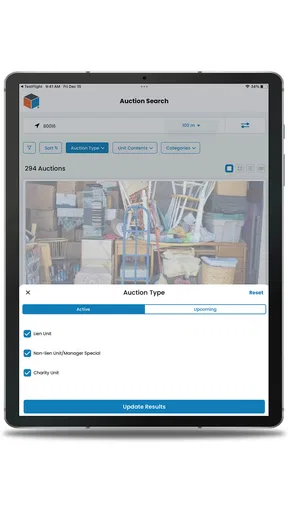
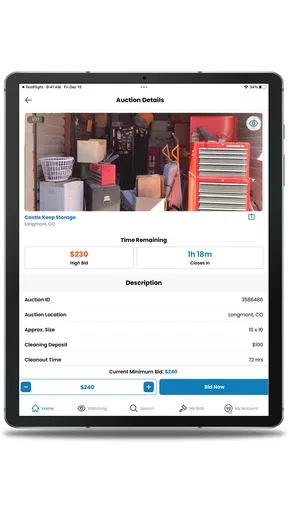
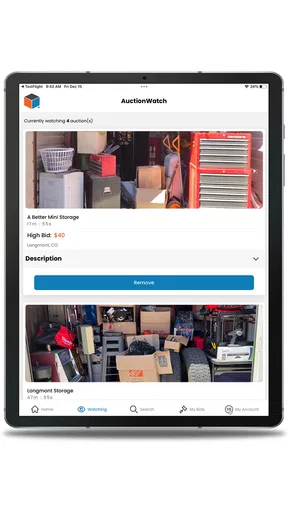
Our Review of StorageTreasures Auction App
 Analysis by Appyee
StorageTreasures Auction App is the kind of shopping app that makes sense only when you enjoy the uncertainty of an auction. I used it with a different mindset from a normal marketplace: I was not browsing finished products with clear prices, but looking for nearby storage-unit opportunities where timing, location, and judgment matter as much as the item itself. That difference shapes almost every part of the experience.
Developed by OpenTech Alliance, this free app focuses on local online storage auctions from a phone. It is aimed at people who want to discover units in their area and place bids without sitting at a computer. The app is listed for Mature 17+ users, runs on Android 7.0 or later, and its current version is 1.22.0. It has passed the early-adopter stage, with over one hundred thousand installs, although its average rating sits at 3.6 from around six hundred ratings, so expectations should be realistic.
What the auction experience feels like on a phone
I find the phone experience most useful when I treat it as a scouting tool, not a shortcut to a quick win. A short check can help me decide which nearby opportunities deserve a closer look, while a careful review keeps the auction’s practical demands in view. That distinction leads naturally to the next question: how to make browsing work when the connection is less dependable.
Why a stable connection matters during browsing
The central appeal is convenience: I can check local listings while away from home, see which opportunities deserve attention, and react when an auction is approaching its end. That convenience depends heavily on connectivity. An auction app is not like a calculator or a downloaded reading app, where a temporary signal problem may be harmless. Listings, images, timing information, and bidding activity all belong to a live marketplace, so a weak connection can turn a quick check into a frustrating pause.
I found the app most useful when I treated it as a live decision tool rather than a catalog to browse casually. A strong connection makes it easier to move between nearby auctions, inspect available listing information, and decide whether a unit is worth further research. On a poor mobile signal, the same workflow becomes less comfortable because waiting for a screen or image can affect how confidently I assess an opportunity.
That is especially important near the end of an auction. A bid is not something I would leave until the last possible moment if my connection were unreliable. Even when the app itself is working correctly, a slow network, a crowded public hotspot, or a brief interruption can leave too little time to review what is happening. My practical advice is simple: if an auction matters to you, check it early, understand your maximum budget beforehand, and avoid making your entire plan depend on a last-second action.
Using it in everyday mobile situations
The app fits naturally into short bursts of attention. I can imagine checking it during a lunch break, while traveling through a nearby town, or before making a weekend plan. That is where it has an advantage over the usual desktop-first auction routine. A phone lets me look for local opportunities at the moment I have the idea, rather than waiting until I am back at a computer.
However, mobile convenience does not remove the real-world work behind a storage auction. A listing may be close enough to consider, but the unit still needs to be judged as a pickup and sorting project, not just as a tempting photograph. I would use the app to discover and monitor opportunities, then think carefully about transport, time, storage space, cleaning, and disposal before bidding.
A realistic scenario would be someone who notices several nearby units during the week and saves the most interesting possibilities mentally for a weekend review. Instead of bidding immediately, I would compare the apparent contents with the distance to the facility and the effort required to clear everything. If a unit looks attractive but would require a van, helpers, and a disposal run, the low bid alone would not make it a good purchase.
This is one of the app’s less obvious lessons: the best mobile workflow is preparation first, bidding second. The phone makes discovery fast, but it can also encourage impulsive decisions because the auction is always within reach. I recommend deciding in advance what kinds of contents, locations, and total costs fit your situation.
How it differs from ordinary shopping apps
Compared with a conventional shopping marketplace, this app offers less certainty and more local context. A typical shopping app lets me compare finished products, seller details, delivery options, and known prices. StorageTreasures instead revolves around the possibility of buying an entire unit, often with incomplete knowledge of what is inside. That makes browsing more exciting, but it also makes the research burden much higher.
It is also different from classified-ad apps. A classified listing usually centers on one item and a direct conversation or fixed price. Here, the attraction is the auction format and the chance to discover storage-related listings near me. I would choose a classifieds app when I already know I want a particular object, but I would choose this one when I am comfortable evaluating a mixed, uncertain lot.
That trade-off affects who should use it. Resellers, collectors, bargain hunters, and people with experience sorting household goods may appreciate the discovery process. Someone who wants a predictable purchase, clear condition, and simple delivery should probably stay with regular retail or fixed-price marketplaces. The app cannot turn an uncertain unit into a guaranteed bargain.
Reading listings with a more careful eye
When I review an auction, I try not to focus only on the most recognizable object in a photo. A visible piece of furniture or electronics can draw attention, but the overall unit may contain bulky, damaged, incomplete, or difficult-to-handle items. I also consider whether I have somewhere to place the contents immediately after pickup. A bargain becomes much less attractive when it creates an urgent storage problem.
Another useful habit is separating estimated resale value from personal usefulness. A unit may contain things I like, but that does not mean those items are easy to sell. Conversely, ordinary household goods may be useful to a reseller if they can be moved efficiently. I would make a rough list of likely categories, then discount my estimate for transport, cleaning, missing parts, and the time needed to find buyers.
The app is therefore most valuable as a way to organize attention. It brings local auction opportunities into one mobile setting, but the quality of the final decision still depends on the user’s discipline. I would never treat a promising image as proof that the contents will justify a bid.
What happens when the connection or timing goes wrong
Connectivity problems are not the only possible source of friction. A user may open the app in a place with weak reception, switch between Wi-Fi and mobile data, or lose time while moving from one task to another. In an auction environment, these ordinary phone problems feel more serious because the opportunity may be time-sensitive.
My approach is to build in recovery time. I review interesting auctions before they become urgent, keep my spending limit written down, and avoid relying on a single hurried session. If a page takes longer than expected, I would close distractions and reconnect through the most reliable network available rather than repeatedly tapping without knowing whether an action registered.
I also prefer confirming the result of any important action before leaving the screen. That is a general mobile habit, but it matters more here because uncertainty about whether a bid or update went through can lead to accidental repetition or a mistaken assumption. The app is easier to use when I give each step a moment to settle instead of treating it like a rapid-fire shopping cart.
For someone who regularly travels through areas with unreliable reception, this limitation deserves serious attention. The app’s main purpose is tied to current online information, so I would not plan an auction strategy around the assumption that every part of the experience will remain available during a dead zone. I would do the research earlier and use the phone near the auction only as a controlled check, not as my entire plan.
Keeping mobile data use sensible
Images are naturally important in a storage auction, and viewing several listings can make a mobile session more demanding than reading short text. I would avoid repeatedly opening the same listing while on a limited data plan. Instead, I would first narrow the search to locations and auctions that genuinely fit my schedule, then inspect the most relevant listings in detail.
That approach has a second benefit: it improves judgment. Rapidly scrolling through every nearby opportunity can create the illusion that I am researching thoroughly, when I am really collecting impressions. A smaller shortlist gives me more time to consider the unit’s likely workload and whether the location is practical.
On Wi-Fi, I would do the deeper browsing and image review. On mobile data, I would use shorter checks to see whether a promising auction still deserves attention. I would also avoid assuming that a quick glance is enough to make a responsible bid. Data-conscious use and budget-conscious use actually support each other here: both encourage slower selection and fewer impulsive decisions.
Who will get the most from it
StorageTreasures Auction App is a good match for people who enjoy local discovery and are willing to do work after the purchase. It can suit a small reseller looking for inventory, a collector who understands the risks of mixed lots, or an experienced bargain hunter who already has transport and sorting plans.
It is less suitable for a first-time buyer who expects a straightforward bargain. New users may underestimate how quickly a unit’s contents can become a logistical project. I would especially caution anyone without spare space, a way to move bulky goods, or enough time to deal with unwanted items. The app makes finding auctions easier; it does not make clearing a unit easy.
The Mature 17+ rating also makes it a poor fit for younger users, even aside from the financial judgment involved. This is an app for adults who can set limits, understand auction uncertainty, and accept responsibility for the practical consequences of a purchase.
What the rating suggests about expectations
The current average of 3.6 is neither a reason to dismiss the app nor a guarantee of a smooth experience for everyone. It tells me to approach it as a useful but imperfect tool. With around three hundred written reviews, there is enough public feedback to show that user experiences are mixed rather than universally enthusiastic.
In my view, the rating makes sense for an app whose usefulness depends on location, network quality, auction timing, and the user’s familiarity with storage-unit buying. Someone who only needs occasional local discovery may find it perfectly worthwhile, while someone expecting a polished retail-style journey may notice every point of friction.
How I would build a safer routine
I would begin by browsing without bidding. The first session should be about learning how local opportunities look, how much travel they involve, and what kind of information is available in the listings I care about. This reduces the chance of making a purchase simply because the auction format feels exciting.
Next, I would choose a narrow personal rule: a maximum total amount, a maximum driving distance, or a limit on the number of units I can handle in one weekend. The exact rule depends on the buyer, but having one is more useful than trying to predict every object inside a unit.
Before an auction becomes urgent, I would check my connection, review the listing again, and make sure I can actually collect and process the contents. I would also keep a recovery plan for ordinary problems: enough time to reconnect, a reliable place to use the app, and no assumption that a last-second attempt will be stress-free.
Finally, I would judge success by the whole project rather than the winning price. The app can help me find an opportunity, but the real cost includes travel, labor, disposal, repairs, and the time spent selling or donating what I do not want. That broader calculation is the difference between a lucky-looking bid and a sensible purchase.
My connectivity verdict
StorageTreasures Auction App works best when I use it as a connected scouting and auction companion, not as a replacement for careful planning. Its mobile format is genuinely useful for discovering local opportunities and checking them during the day, but that benefit comes with a dependence on timely online access and the user’s ability to recover from interruptions.
I would recommend it to adults who already understand that storage auctions are uncertain and physical. The free price makes trying it easy, and the focus on nearby online auctions gives it a clear purpose that ordinary shopping apps do not provide. Still, I would not recommend it to someone seeking fixed prices, predictable condition, or effortless delivery.
My final opinion is cautiously positive. The app gives the right kind of buyer a convenient way to keep local auctions within reach, especially when used with a stable connection and a preplanned budget. Its strongest feature is not that it removes the difficulty of storage auctions, but that it makes the discovery and monitoring stage more accessible from a phone. If you remember that distinction, use data and time thoughtfully, and treat every bid as a real logistical commitment, it can become a practical part of your auction routine.
Verdict
Strengths of StorageTreasures Auction App
- Browse and bid on storage auctions directly from your phone.
- Auction listings include photos, locations, and closing times.
- Search and filtering tools make it easier to find nearby units.
- Push notifications can help you track bids and auction updates.
- Useful for discovering deals without attending every auction in person.
Limitations of StorageTreasures Auction App
- Auction availability and coverage may vary significantly by location.
- Photos may not reveal the full condition or contents of a storage unit.
- Winning bids can involve additional buyer fees or pickup requirements.
- Strict payment and collection deadlines may leave little room for delays.
- The app may require careful research since unit contents are sold as-is.
Similar Picks in This Category
View All
SHEIN-Shopping Online
Roadget Business PTE. LTD.4.8

Amazon Shopping
Amazon Mobile LLC4.4


Mercado Libre: Compras online
Mercado Libre4.8

Wish: Shop and Save
Wish US Holdings LLC4.7

Alibaba.com - B2B marketplace
Alibaba Mobile4.4
Frequently Asked Questions
What is the StorageTreasures Auction App?
StorageTreasures Auction App is a mobile platform for browsing and participating in online auctions of abandoned storage units and other surplus items. After installing it, users can view available listings, inspect photos and descriptions, follow auction activity, and place bids from a phone or tablet. Listings and auction rules may vary by location, so reading each lot’s details is essential before bidding.
How do I place a bid on a storage unit?
To place a bid, you generally need to create an account, sign in, verify any requested information, and open an active auction listing. From there, you can enter your maximum bid or submit a bid according to the auction’s rules. Before confirming, check the buyer’s premium, taxes, payment deadline, pickup instructions, and whether the bid is binding, since winning an auction usually creates a purchase obligation.
Are the items in StorageTreasures auctions guaranteed to be in good condition?
No. Storage unit auctions are commonly sold as-is, and the available photos or descriptions may not reveal every item or condition issue. Images can be limited, and some belongings may be hidden inside boxes or containers. Before bidding, carefully review all listing information, estimate cleaning and disposal costs, and avoid assuming that valuable items are present simply because they appear in a photograph.
What happens after I win an auction?
After winning, you normally receive instructions from the facility or auction service explaining how and when to pay and collect the unit. Payment may need to be completed within a short period, and pickup appointments or identification requirements may apply. You are typically responsible for removing all contents, cleaning the space, and following the facility’s rules. Missing the deadline can result in additional fees or cancellation.
Is the StorageTreasures Auction App free to download and use?
The app may be available to download without an upfront charge, but participating in auctions can involve several additional costs. Depending on the listing and location, you may encounter buyer’s premiums, sales tax, cleaning deposits, late fees, payment-processing charges, or transportation and disposal expenses. Review the final bid total and the auction’s terms carefully before confirming any purchase, especially when calculating your maximum budget.
